Software architecture · part 5 of 6
Feature flags: releasing features without a new deploy
A feature flag turns parts of the code on and off without a new deploy. Learn the flag types, gradual rollout, kill switches, testing and technical debt.
intermediateRevised on · 40 min read
Inside the fuse box of an old building, each circuit has a label: party room, elevator, garage. When the party room has a problem, the building manager switches off only that breaker, and the rest of the building stays lit. Nobody rewires anything or shuts the whole building down. A feature flag does the same thing to a piece of software. The code holds the new path and the old one, and an external switch, the flag, decides which of the two runs at a given moment. Changing the switch does not require building a new version of the program.
The analogy has a dangerous side. A breaker without a label becomes a mystery at midnight, and a flag without an owner becomes the same mystery in the code, only more slowly. That is why this lesson does not stop at “how to turn it on.” It covers what a flag is, the four types you will run into, how the value reaches the application, gradual rollout, the difference between evaluating on the server and on the client, the problem of state and consistency, the kill switch, testing, the debt that flags leave behind, and the tools, including OpenFeature. The Go examples were run during this review, and the versions cited are listed in the tools section.
Lesson map
| Part | Sections | Question it answers |
|---|---|---|
| 1. Concept and motivation | 1 to 3 | What is a flag, what problem does it solve, and where does it show up? |
| 2. Types and operation | 4 and 5 | Which types exist, and how does the value reach the application? |
| 3. Release and evaluation | 6 to 8 | How do you release gradually, where do you evaluate, and what happens when the state is out of date? |
| 4. Operation and context | 9 and 10 | How do you turn a feature off in a hurry, and which data does the evaluation use? |
| 5. Testing, debt and tools | 11 to 13 | How do you test, when do you remove a flag, and which library do you use? |
| 6. Practice | 14 to 17 | Common mistakes, when not to use flags, exercises and glossary. |
1. What a feature flag is
A feature flag, also called a feature toggle, is a conditional whose value is not written in the code. It is an if whose condition comes from an external source, such as a dashboard, a configuration file or a dedicated service, and that source can change while the application runs. The application asks for the flag by name, receives a value, and follows one of the paths.
To see why this matters, separate two verbs that are often treated as synonyms. Deploy means putting code into production. Release means making the feature available to users. Without a flag, the two happen together: as soon as the code reaches the server, every user sees the feature. With a flag, the code can sit in production for weeks before any user sees it, and the release becomes a separate decision that can be reverted without touching the deploy.
A typical snippet looks like this. The example is illustrative and follows the same pattern as the code run in section 11:
if client.Boolean(ctx, "novo-checkout", false, contexto) {
    return fluxoNovo(pedido)
}
return fluxoAntigo(pedido)
The second argument, false, is the default value. It appears in every call, and section 9 explains why it deserves attention.
2. What it is for: the problem before flags
Before flags, the usual way to hide unfinished work was a branch that lived for weeks outside the main line. When it was finally merged, the merge brought conflicts with days of other people’s changes, and the bug only showed up after everything was together. The longer a branch stayed isolated, the more expensive it became to put everything back together.
The second pain is reverting. If the new version breaks, the classic move is to roll back the deploy, which restores the previous version and sometimes undoes other changes that went live with it. With a flag, reverting means changing a value, and the code does not have to be built again. That shortens the gap between noticing the problem and getting back to normal, which is exactly the gap that costs the most during an incident.
The third pain is testing with real people without betting everything. A small group gets the new code, the team compares metrics and decides whether to expand. This is only possible because the decision about who gets what is not tied to the image that was published.
A flag does not replace testing or review. It changes the moment the risk materializes and offers a quick way out. Anyone who uses the flag as an excuse not to test ends up with a switched-off flag and a bug that only appears when someone turns it on.
3. Examples in different contexts
A store working on the new checkout can merge unfinished code and leave the novo-checkout flag off. Developers integrate every day, the new code lives in the main repository, and no customer sees a half-built screen. When the flow is ready, the flag is turned on for a small share of customers.
A video platform has an operational flag called recomendacoes-home. When the recommendations database struggles under the load of an event, operations turns the flag off, and the home page shows a fixed list of popular videos. The page keeps loading, the database gets room to breathe, and nobody had to wait for a deploy to make that happen.
A product team wants to know whether a purchase button reading “Buy now” converts better than one reading “Add to cart”. Half the users see each text, and the flag decides each user’s group. At the end, the analysis compares the conversion rates, and the experiment’s flag is removed.
An invoicing service releases a PDF export feature first to internal test accounts and later to the paid plan. Here the flag is not concerned with release risk. It represents a business rule, which may last for years.
An integration with a new payment method starts with the pagamento-pix flag off in production. The team turns the new path on for test accounts, checks reconciliation, and then opens it to everyone else. If the provider goes down, the same flag sends payments back to the old method.
These five cases are not the same problem, and that matters when choosing the type, which is the subject of the next section. What ties them together is that the decision about who sees what stops being code and becomes data.
4. The four types of flag
Pete Hodgson described, in an article published on Martin Fowler’s site in 2017, a classification with four types of toggle. It is still useful because each type has a different lifetime and a different owner, and mixing up the types is the main reason flags never leave the code.
The release flag exists to deliver work that is still being rolled out. It should not last long. Hodgson suggests it should not survive more than one or two weeks, except for flags centered on the product. Whoever changes it is usually the delivery team, through new code or a configuration change. The typical case is the novo-checkout from the earlier example.
The experiment flag compares variants and usually has a static configuration during the test. Its lifetime ranges from hours to weeks, and the parameters are usually defined by the product team, not the development team. It ends when the test closes, and the losing path should be removed from the code.
The operational flag is the one operations uses to react to a situation. The kill switch is the best-known example. Its lifetime is mixed: most are short, but a kill switch can stay in the code for years, because the moment it will be needed is unpredictable. Operations changes it, and operations has to act without waiting for a release, because an incident does not wait.
The permission flag decides who has access to a resource, based on the user, the plan or another business rule. It can last for years, because it represents part of the product and not a development step. Hodgson notes that it is decided per request, based on the user.
In the colors of the figure below, blue, purple, orange and green identify the types. They do not follow the role map of section 5, so read the figure by its text.
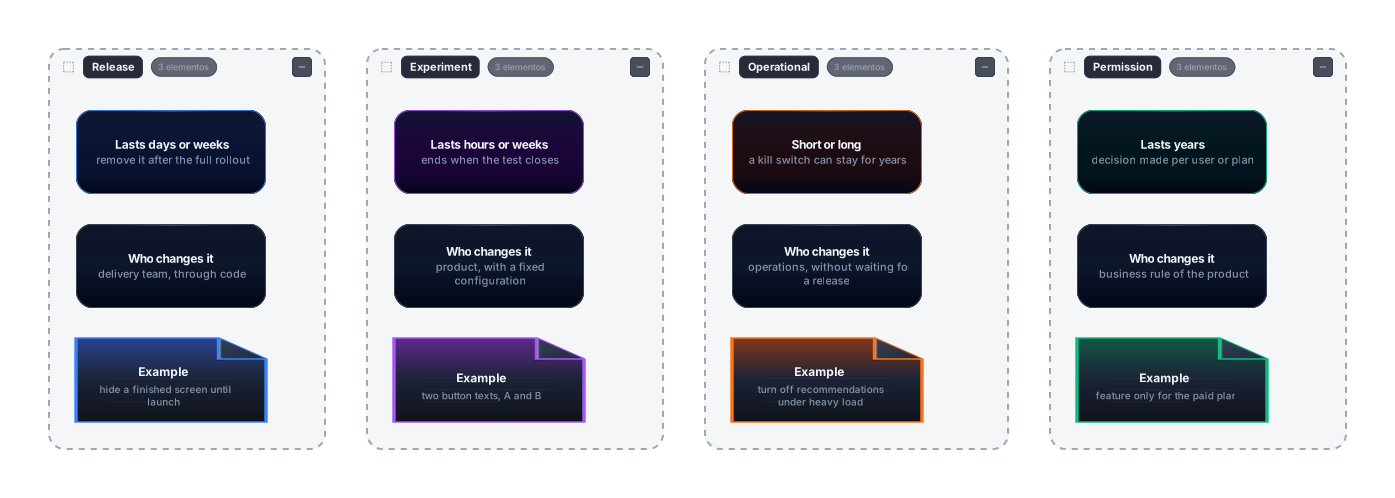
Read the figure column by column. In each one, the first box says how long the flag lasts, the second says who changes it, and the third shows an example. The table below summarizes the comparison, for when you want to check it without rereading the section.
| Type | Typical lifetime | Who changes it | Example |
|---|---|---|---|
| Release | Days or weeks | Delivery team | Finished screen hidden until launch |
| Experiment | Hours or weeks | Product | Two button texts |
| Operational | Short, or long in the case of a kill switch | Operations | Turning off recommendations under load |
| Permission | Years | Business rule | Feature only for the paid plan |
5. How a flag is evaluated under the hood
A flag call goes through three parts. The first is the SDK, the library the application imports and calls, such as client.Boolean(...). The second is the provider, the component that translates that call into the real flag system, whether it is a file, an in-house service or a vendor. The third is the configuration, where the rules, the state of each flag and the rollout percentage live. Section 13 comes back to the provider in more detail.
The default value is the argument the application passes in every call. It comes back when nothing can resolve the flag, for example because the provider is down or because the flag does not exist. The evaluation context is the data about who is asking, such as id, plan and country, and section 10 details it.
The figure shows the path of a call from the code to the configuration, and the change that comes from the other side. Read it from left to right, keeping in mind that the layout is a column. The call starts in the application code and passes through the SDK, which hands it to the provider. The provider queries the configuration and returns the value with a reason. The operator appears alone, on the right, because it is not part of the request: it changes the rule in the configuration, and the next query already sees the change.
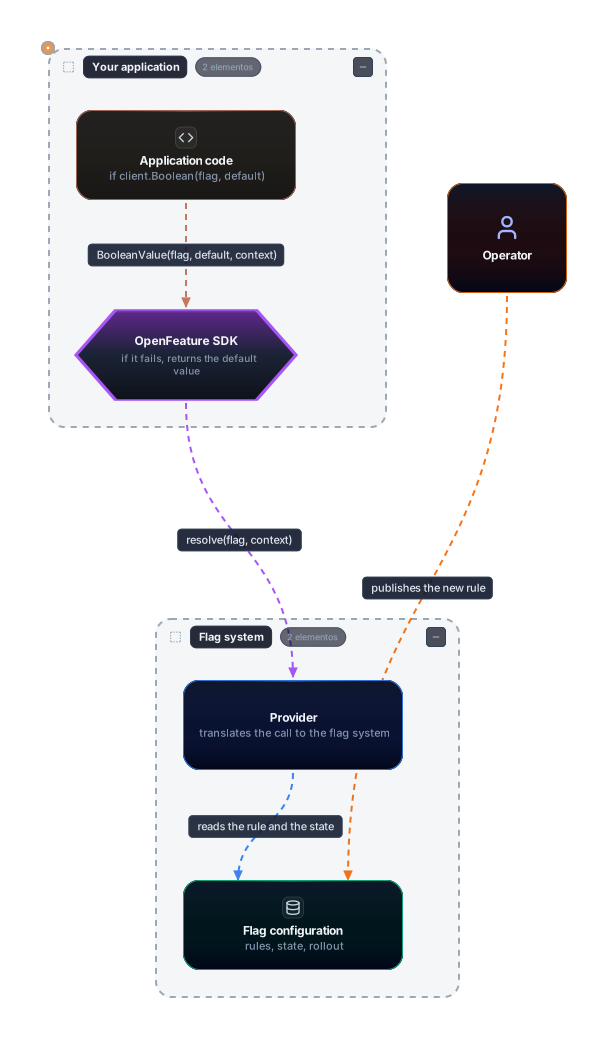
Three points in the figure deserve attention. The first is that the application never talks to the configuration directly. It talks to the SDK, and the SDK talks to the provider. The second is that the operator changes the rule without going through the application, so the change takes effect without a deploy. The third is the error path, which does not appear as an arrow: if the provider fails, the SDK returns the default value instead of throwing an exception. The OpenFeature specification requires this. The client evaluation methods cannot throw an exception or terminate abnormally, and on failure they return the default value.
In the figure, colors follow a fixed map that applies to the figures that come after it. Orange is whoever decides, such as operations or the product. Purple is the contract, the API the application sees. Blue is the provider, the adapter. Green is the configuration and the rules. Terracotta is your application. Pink is failure or risk. Gray is a third-party service or the default value.
When evaluation succeeds, the call returns the value and a reason, called reason in the specification. When it fails, it also returns an error code, such as FLAG_NOT_FOUND. Section 13 has the full list of reasons and codes, and the Go example in that section shows the difference with real output.
6. Gradual and percentage rollout
Releasing a feature to 100% of users at once concentrates the risk. If there is a defect that only shows up with real data or real load, it hits everyone at the same time. A gradual rollout splits the exposure into stages, for example 1%, 5%, 25%, 50% and 100%, and watches the metrics at each stage before moving on. When something gets worse, the rollout stops, and few users were affected.
For a stage to make sense, the flag has to decide deterministically. The same user must get the same result on every call. If the decision were drawn at random on each request, a user would see the new screen on one page and the old one on the next, which confuses the user and contaminates the experiment’s measurements. The usual technique is to compute a stable number from the flag name and the user identifier, reduce it to a range from 0 to 99, called a bucket here, and release the feature to the buckets below the percentage. Including the flag name in the calculation means the groups of two different flags do not always coincide.
The following code uses only the Go standard library. It does not depend on OpenFeature, because the bucket calculation is the same in any flag system. The chosen hash is 32-bit FNV-1a:
package main

import (
	"fmt"
	"hash/fnv"
)

// balde returns a number from 0 to 99 that is always the same for the same (flag, user) pair.
func balde(flag, usuario string) uint32 {
	h := fnv.New32a()
	h.Write([]byte(flag + "|" + usuario))
	return h.Sum32() % 100
}

// ativa reports whether the user falls inside the released percentage.
func ativa(flag, usuario string, porcentagem uint32) bool {
	return balde(flag, usuario) < porcentagem
}

func main() {
	usuarios := []string{"ana", "bruno", "carla", "diego", "elisa", "fabio", "gabi", "heitor", "ines", "joao"}
	for _, u := range usuarios {
		fmt.Printf("%-7s balde=%2d 10%%=%t\n", u, balde("novo-checkout", u), ativa("novo-checkout", u, 10))
	}

	// Same user, same answer on repeated calls.
	fmt.Println("repetido:", ativa("novo-checkout", "ana", 10), ativa("novo-checkout", "ana", 10))

	// Count over 10,000 fictitious users: the fraction should be close to 10%.
	n := 0
	for i := 0; i < 10000; i++ {
		if ativa("novo-checkout", fmt.Sprintf("u%05d", i), 10) {
			n++
		}
	}
	fmt.Printf("liberados em 10000: %d (%.1f%%)\n", n, float64(n)/100)
}
The real output, with Go 1.27.2, was this:
ana     balde=42 10%=false
bruno   balde= 0 10%=true
carla   balde=97 10%=false
diego   balde=92 10%=false
elisa   balde=92 10%=false
fabio   balde=13 10%=false
gabi    balde= 9 10%=true
heitor  balde=95 10%=false
ines    balde=75 10%=false
joao    balde=75 10%=false
repetido: false false
liberados em 10000: 1019 (10.2%)
Three details stand out. The same user gets the same answer in the two consecutive calls. Out of 10,000 fictitious users, 1,019 fell in the 10% range, which is 10.2%, a reasonable difference for a sample of that size. And because the bucket does not change, whoever was already inside stays inside when the percentage rises to 25% or 50%: the range only grows, and nobody leaves it. That last property is what turns a rollout into a ladder instead of a roulette wheel.
The next figure shows the same reasoning in the decision flow, and the ladder of percentages through which operations moves forward without a deploy.
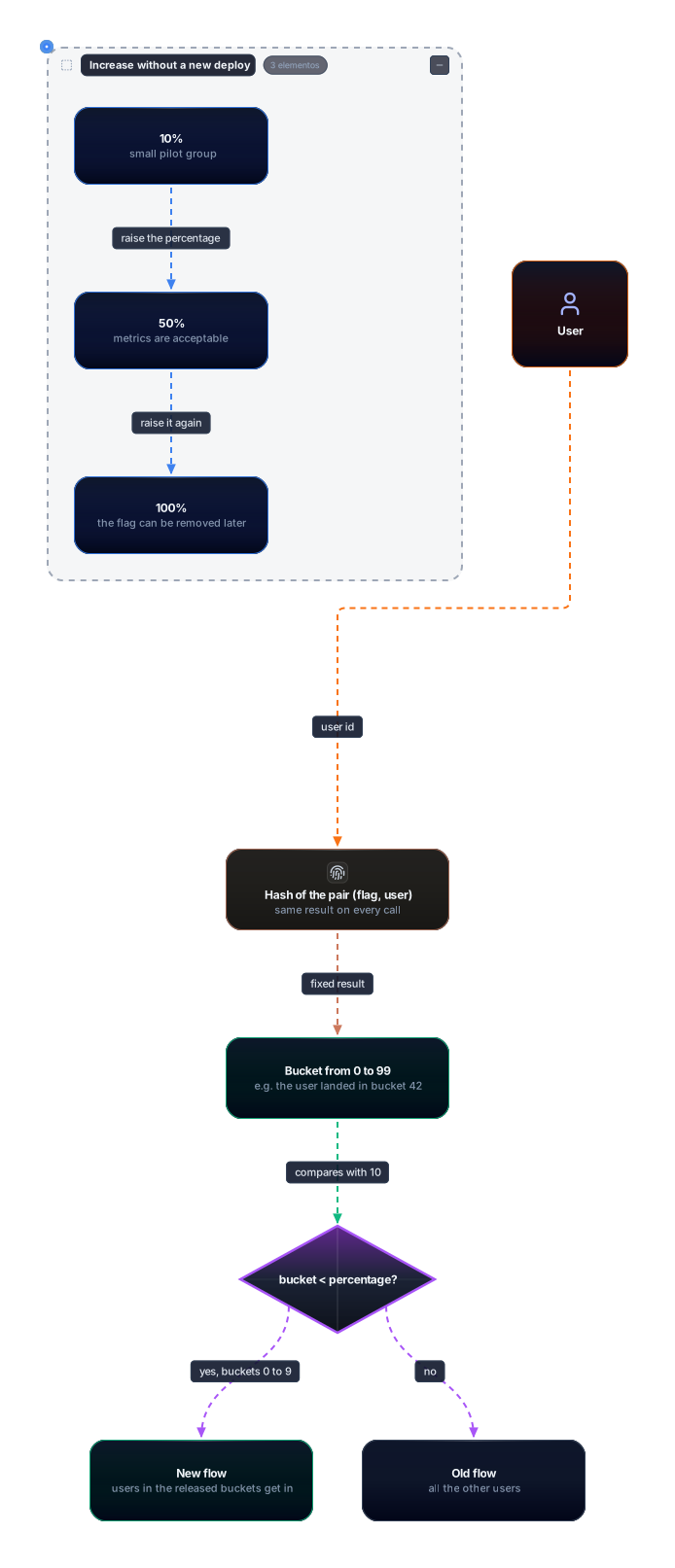
In the figure, the user enters on the left side of the flow, as an orange actor. The identifier goes through the hash, which produces a fixed result, and that result falls into a bucket. The diamond compares the bucket with the percentage. Those below it enter the new flow, in green, and the rest stay on the old flow. The ladder, in the group at the top, shows the stages of 10%, 50% and 100%, each advanced by a configuration change. For the ladder to work, the id has to be stable. If the id changes between sessions, the user changes bucket and the measurement loses its meaning.
Two practical points remain. The first is that the hash function is part of the contract. Changing the algorithm reshuffles every user and can re-expose people who had already been released. The second is that the percentage depends on an identifier, and the OpenFeature specification calls this the targeting key, an optional context field that providers usually require for fractional evaluations. Without it, the evaluation cannot be stable.
7. Server-side and client-side evaluation
A flag can be evaluated in two places, and the choice changes what is easy, what is safe and what can be measured. With server-side evaluation, the rule lives in the backend. The browser or the app asks for a screen, the server evaluates the flags and returns the result, usually already applied to the response. With client-side evaluation, the SDK runs in the browser or the app, receives the full rules and evaluates everything locally.
Server-side evaluation has three advantages. The rules never leave the server, which matters when they mention business criteria or sensitive data. The client receives only the result and cannot read the condition that allowed or blocked the feature. And the server sees the decision in the same place where it affects behavior, which makes logging and measurement easier. The cost is a network dependency: each decision that requires a query can add latency, and a server outage affects the flag.
Client-side evaluation trades those points. It is fast, because there is no round trip per decision, and it keeps working even when the network fails after the initial load. On the other hand, the rules reach the browser along with the page. Anyone who opens the developer tools can read the criteria, and anyone who wants to bypass a feature knows exactly which condition to look for. So client-side evaluation suits interface flags and experiments without sensitive data, and suits permissions poorly.
The OpenFeature specification distinguishes these models. In the static context paradigm, used by client-side SDKs, the context is global and cannot be supplied per call. The provider states include a RECONCILING value, which exists precisely because this kind of provider has to re-evaluate the flags when the global context changes.
The figure compares the two paths side by side. On the left, the browser asks the API for the page, and only the result comes back. On the right, the JSON with the rules reaches the browser, and the SDK decides on its own.
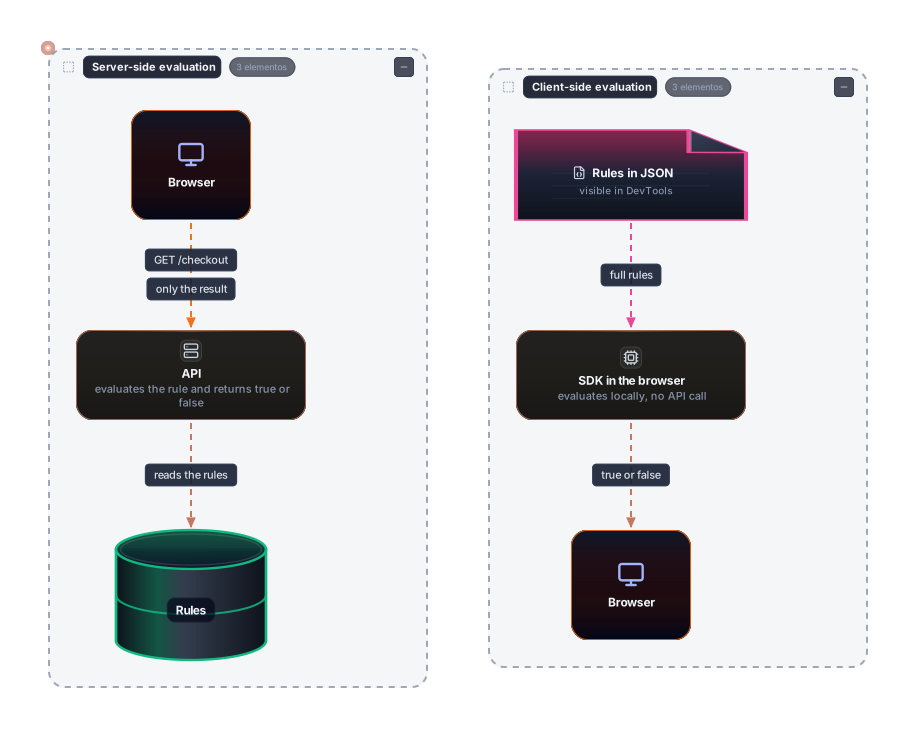
The figure is a comparison, so read each group as a complete path. In the left group, the result line appears only after the API, and the rules sit in the green cylinder on the server side. In the right group, the pink box with the JSON is the point of attention: it sits in the browser, which is what the pink color signals. The pink arrow between the JSON and the SDK shows that the full rules travel to the client.
A practical rule solves most cases. If the decision depends on data the user should not know, evaluation stays on the server. If the decision only changes appearance and protects nothing, client-side evaluation may be acceptable. A flag must never be the only authorization mechanism, because it is a product decision, not a security barrier.
8. State and consistency
A flag is a state the application queries, and distributed state always brings the consistency problem. Each instance of the service keeps a copy of the rules, usually in memory, and needs a way to update that copy. There are two main ways. The first is polling, where the instance asks the configuration every interval, for example every 30 seconds. The second is push, where the configuration sends the change as soon as it happens, over an open connection. The OFREP protocol, described by OpenFeature, gained SSE support, a server-to-client event stream, in version 0.3.0, according to the official post from August 2026.
With either approach, there is a window where the instances diverge. If operations changes the percentage from 10% to 50%, instance A may receive the change immediately, while instance B only queries the configuration on the next cycle. During that interval, the same request can get different answers depending on which instance served it. The flag is behaving as designed. The divergence comes from having several replicas with local copies, and the project has to decide how much lag it accepts.
The good practice for the common case is to read the flag once at the start of each request and use that value until the request ends. If the application queries the flag three times in the same flow, the change can happen between the first and the third query, and the request ends up with two incompatible decisions. A per-request snapshot removes that situation with no extra work.
The SDK also needs to know what state the provider is in. The specification defines the states NOT_READY, READY, STALE, ERROR and FATAL. The STALE state indicates that the provider’s cache may be out of date and is no longer reliable as a source of truth. That is why application startup should wait for the provider to be ready before serving the first request. In the Go library, SetProviderAndWait blocks until the provider is ready or fails.
The figure below shows this lag as a sequence of messages. The timeline runs from top to bottom, and each column is a participant.
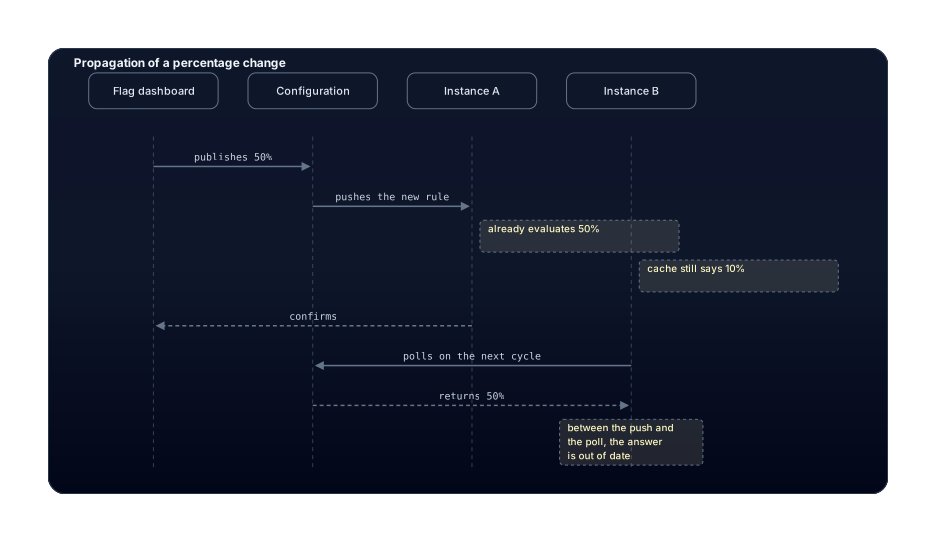
The figure shows the moment the lag appears. The dashboard publishes the new percentage, and the configuration pushes it to instance A, which confirms it and starts evaluating 50%. Instance B still says 10% from its cache, and receives the new rule only when it queries the configuration on the next cycle. The side notes mark the interval where the two instances give different answers. The last line is a reminder that this window exists by construction, and the application must be prepared for it.
9. Kill switch
A kill switch is an operational flag whose only job is to turn a feature off quickly. It exists for the worst moment of an incident, when the team needs to stop a behavior and has no time to build, test and publish a fix. With a kill switch, operations turns the flag off, the configuration publishes the new state, and the instances start evaluating the off value within seconds or minutes, depending on the update mechanism in section 8.
A kill switch only works if three conditions hold. The first is that the old path, or a degraded path, still exists in the code. If the team deleted the old code as soon as the rollout reached 100%, the kill switch has nowhere to send the traffic. The second is that the default value in the code is chosen with the failure of the flag system in mind, because that is the value the application uses when the configuration does not respond. The third is that someone has rehearsed the shutdown before the incident. Turning the flag off for the first time during a crisis is a painful way to discover that the permission was never set up.
The default value deserves particular care, and the example in section 13 shows why. It is what the application receives when the flag is off in the provider. In the in-memory provider used in the example, a flag with the Disabled state returns the default value passed by the call, not the value of the variant. In the example, the call passed true as the default and the flag was off, so the answer was true. A kill switch meant to turn off Pix payments therefore needs a default of false in the code, otherwise the shutdown itself leaves the feature on.
The figure below shows a kill switch being triggered after an alert. Operations appears with the action, the configuration publishes the state, and the application evaluates the flag on the next request. The new path is blocked, and the old one receives the traffic.
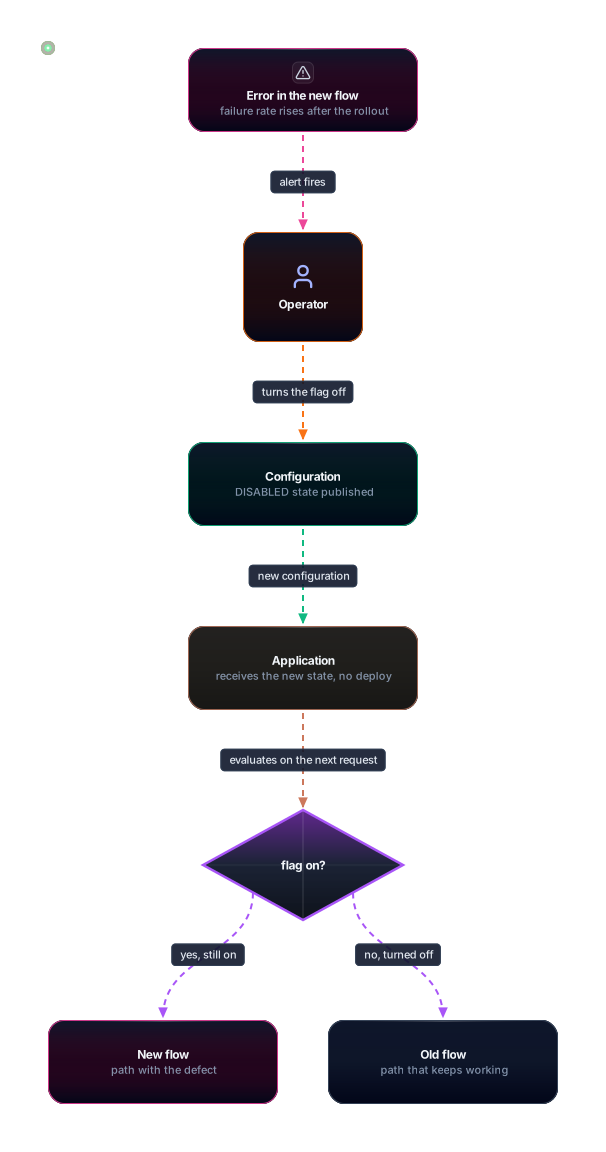
Read the figure from top to bottom. The alert fires because the failure rate on the new flow rises. Operations turns the flag off in the dashboard, and the configuration publishes the off state. The application receives that configuration and uses it on the next request, which goes through the diamond. The new path shows an X, indicating that traffic was blocked, and the old one receives the requests. Pink marks the defect and green marks the path that keeps working.
Finally, the kill switch is one of the few flags that benefit from logging. Who turned it off, when and why should stay in the flag system’s history or the operations log. Without that, the team spends the next day asking who touched the button.
10. Evaluation context
The evaluation context is the data the application passes so that a flag can decide. It can contain a targeting key, which identifies the subject of the evaluation, usually a user id, and custom attributes, such as plan, country or app version. The specification requires the targeting key to be an optional string field, and custom attributes to accept booleans, strings, numbers, dates and structures.
Without context, the flag answers everyone the same way, which suits a global kill switch but not a paid-plan rule. With context, the rule can say “enabled for the pro plan in São Paulo” without the flag’s code knowing any users. That is the role of context: turning a boolean key into a decision about who asked.
The specification organizes context into layers, and the merge order matters. The global context is the base and has the lowest precedence. Next comes the transaction context, which the application propagates through a request, then the client context, and last the invocation context, which is the specific call. Before-evaluation hooks can rewrite the context last. When two layers share a key, the more specific layer wins.
The figure shows that chain. Each box is a layer, and each arrow is a merge in which the next layer overwrites repeated keys.
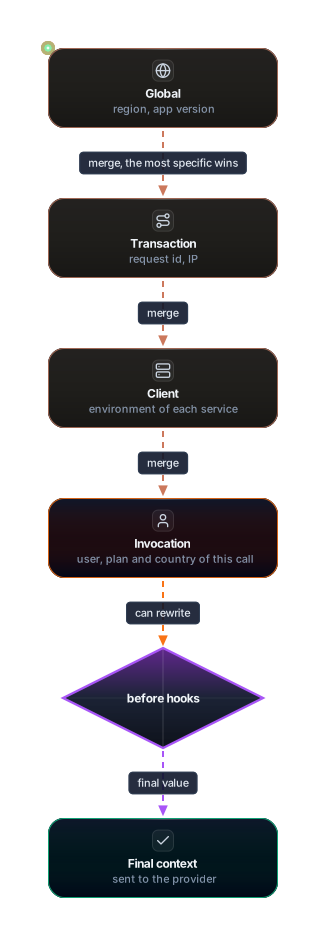
Read the figure from top to bottom. The global context holds data that applies to the whole service, such as region and app version. The transaction adds data from the request, such as the id and the IP. The client adds each service’s environment, and the invocation adds the user for that call. The diamond for hooks can still rewrite the context before the decision, and the final result is what goes to the provider. Note that the invocation, in orange, is the layer of whoever decides on the call, which is why it wins over the others.
A good practice follows from this. Send the flag only what the rule uses. A user id is enough for most percentages, and a full email address is usually more data than a decision needs. Anyone sending personal data to the flag system should go through the same privacy review as any other external service, because in many cases the context leaves the application.
11. Testing with flags
A flag creates two paths in the code, and two flags create four combinations. With ten independent flags there are 1,024 combinations, and no team tests all of them. The most useful strategy separates two problems: test each flag in its two states, and test the interaction between flags only where they actually meet. An integration test can cover the critical combination, such as the new checkout with the new payment method, and the rest get simple unit tests.
The unit test needs to control the flag’s state without depending on an external system. The in-memory OpenFeature provider is a natural choice for this. It takes the flags as a map, and the test sets each flag’s state. In the example below, the code under test computes an order total and applies a 10% discount when the desconto-natal flag is on. Each test builds the provider with the state it wants to check and calls the function. The production file is checkout.go, and the tests are in checkout_test.go.
package main

import (
	"context"

	"github.com/open-feature/go-sdk/openfeature"
)

// Final order value. The flag decides whether the 10% discount applies.
func total(ctx context.Context, client *openfeature.Client, subtotal int64) int64 {
	if client.Boolean(ctx, "desconto-natal", false, openfeature.EvaluationContext{}) {
		return subtotal - subtotal/10
	}
	return subtotal
}
package main
import (
"context"
"testing"
"github.com/open-feature/go-sdk/openfeature"
"github.com/open-feature/go-sdk/openfeature/memprovider"
)
func clienteComFlag(t *testing.T, ativa bool) *openfeature.Client {
t.Helper()
// An enabled flag returns the variant default; a disabled one returns the call's default value.
variante := "off"
estado := memprovider.Disabled
if ativa {
variante = "on"
estado = memprovider.Enabled
}
p := memprovider.NewInMemoryProvider(map[string]memprovider.InMemoryFlag{
"desconto-natal": {
State: estado,
DefaultVariant: variante,
Variants: map[string]any{"on": true, "off": false},
},
})
// The OpenFeature API is a global singleton: each call swaps the provider.
// That is why these tests cannot run with t.Parallel().
if err := openfeature.SetProviderAndWait(p); err != nil {
t.Fatal(err)
}
return openfeature.NewClient("checkout-" + map[bool]string{true: "on", false: "off"}[ativa])
}
func TestTotalComFlagLigada(t *testing.T) {
c := clienteComFlag(t, true)
if got := total(context.Background(), c, 1000); got != 900 {
t.Fatalf("esperava 900, veio %d", got)
}
}
func TestTotalComFlagDesligada(t *testing.T) {
c := clienteComFlag(t, false)
if got := total(context.Background(), c, 1000); got != 1000 {
t.Fatalf("esperava 1000, veio %d", got)
}
}This is the real output of go test -v from this review. The timing changes from one run to the next:
=== RUN   TestTotalComFlagLigada
--- PASS: TestTotalComFlagLigada (0.00s)
=== RUN   TestTotalComFlagDesligada
--- PASS: TestTotalComFlagDesligada (0.00s)
PASS
ok  	testflags	0.226s
There is a hidden trap in this code, and it matters more than the test itself. Because the OpenFeature API is a global singleton by default, each SetProviderAndWait swaps the provider for the whole process. The tests pass because they run in sequence. If someone adds t.Parallel(), one test may read the other’s provider and fail intermittently. The specification anticipates isolated instances of the API, but that feature is marked experimental in v0.9.0, so the safe path today is to keep the tests sequential or to isolate the state carefully.
Beyond the two states, test the path where the flag does not exist, because it uses the default value and is what runs when the configuration is incomplete. The next figure shows the structure of that test: a test sets up the provider with a state, the code under test queries the flag, and each case leads to a different path.
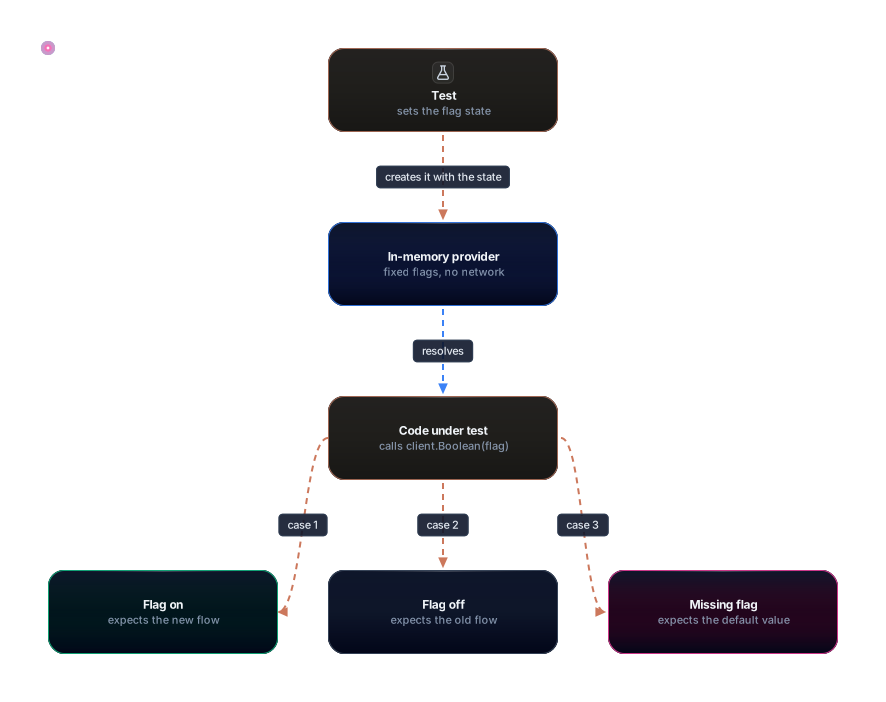
The figure shows how the test is assembled, from top to bottom. The test sets the flag’s state, and the in-memory provider, in blue, holds that configuration without touching the network. The code under test calls the flag, and three cases come out of it, each with its expected path. The missing-flag case, in pink, is the one that usually goes untested, and it protects the application when someone forgets to register the flag in an environment.
12. Technical debt and removing old flags
Every flag leaves a cost after it has served its purpose. Hodgson notes that flags tend to multiply quickly and that each one carries a maintenance cost, because the code it controls stays in the repository, has to be understood by whoever arrives, and has to be tested. A forgotten release flag seems harmless, but it is an if nobody knows still makes sense, and its old path rots silently without ever being exercised.
The lifecycle of a release flag should be short and predictable. It is born off, goes through a pilot, rises to 100% and is removed. The figure shows that path and the detour every team knows: the flag that reaches 100% and is never cleaned up.
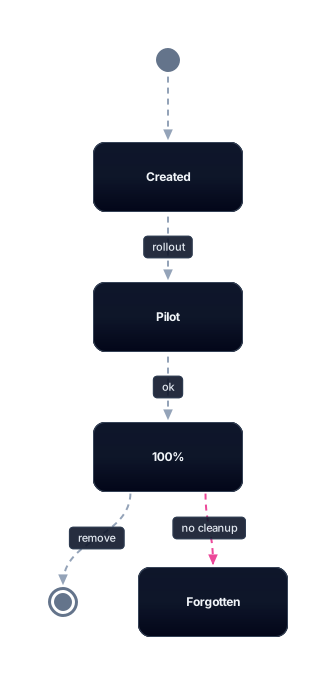
Read the figure from top to bottom. The flag starts as created, with no exposure. A rollout takes it to the pilot, and then to 100%, when the new flow is already the default. Removal is the final state, which happens when the old code is deleted and the flag leaves the system. The pink path to “Forgotten” is the defect: the flag stays in the code and in the configuration after reaching 100%, and nobody has the task of cleaning it up. The list of practices below is what prevents that detour.
Some practices greatly reduce the chance of a forgotten flag. Each flag should have a registered owner, the person or team responsible for removing it. Each release or experiment flag should have an expiration date agreed on at creation, and the removal task should live in the same ticket that created the flag, not in a separate backlog that nobody opens. Hodgson also suggests “time bombs”, tests that fail after a date, which force the conversation before the flag becomes part of the landscape. Finally, it is worth keeping an inventory of active flags and a reasonable limit on their number, since a high count indicates that cleanup is overdue.
Not every flag should be removed. Permission flags represent a product rule and can last for years, and removing them means changing the product. The mistake is treating a permission flag as if it were a release flag, or the reverse, without noticing that its lifetime is different. The classification in section 4 is what prevents that confusion.
13. Tools and OpenFeature
Each flag vendor has historically shipped its own SDK, with its own calls and its own rule format. Switching vendors meant rewriting all the code that queried flags, which tied the application to the vendor. OpenFeature is a standardization project that defines a common API for the application and a provider interface for each flag system. The application calls the API, and the provider does the translation.
The figure shows this separation. The application sees only the API, and the providers sit behind it, each talking to a different system.
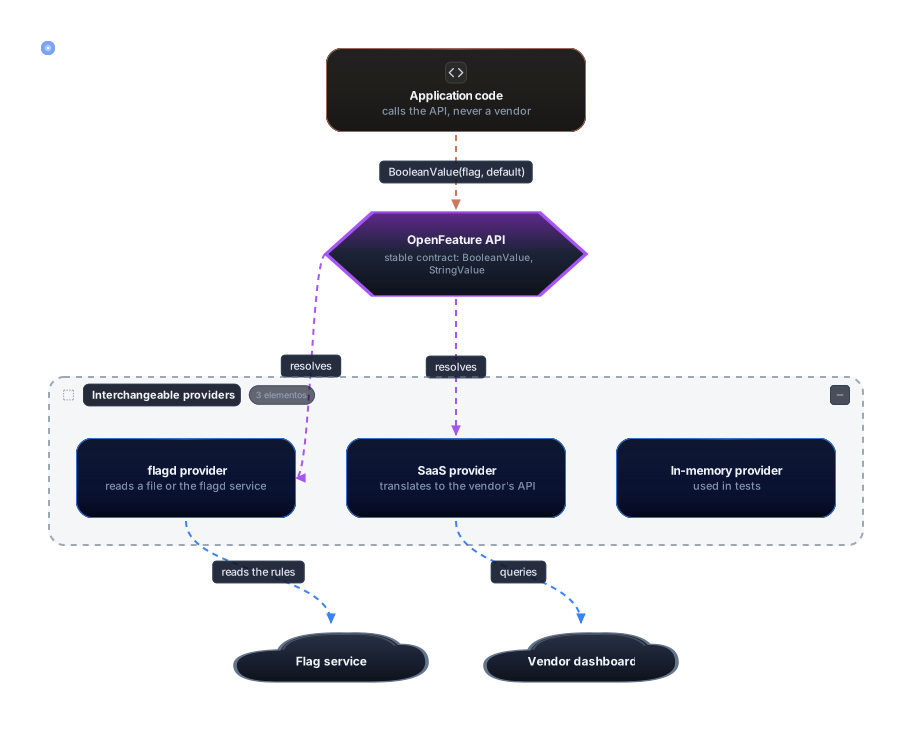
The reading is direct: the purple box is the contract, and everything below it can be swapped without rewriting the application’s code. The providers in the blue group are interchangeable, and each one points to a different service, in light blue on the arrows and in gray on the clouds. The in-memory provider appears as the third item in the group, and it is what you use in tests. When the application changes vendor, it swaps the provider at startup, and the rest of the code stays the same.
The versions cited below were checked on November 2, 2026, through the GitHub releases API and the official specification text. The most recent specification is v0.9.0, published on July 29, 2026. According to the official post of August 12, 2026, it is the first release of the spec since v0.8.0, from March 2024, and it introduces three breaking changes, identified as spec#280, spec#306 and spec#360. The post does not describe those changes, so before upgrading a provider, read the release notes. The same post says that compatibility with v0.9.0 is still in progress across the ten SDKs, so the same behavior may vary from one language to another. The stable SDKs checked in this review were Go SDK v1.20.0, published on October 24, 2026, Java SDK v1.23.0, published on September 28, 2026, and Python SDK v0.10.0, published on June 1, 2026. For the JavaScript SDK, the API query did not return the core version, so it is not cited here.
The table below gathers the reasons and error codes defined in specification v0.9.0. The reason explains why the value was returned, and the code explains why the evaluation failed.
Reason (reason) | Meaning |
|---|---|
| STATIC | Fixed value, with no dynamic evaluation |
| DEFAULT | Default value, because nothing was evaluated or the evaluation produced no result |
| TARGETING_MATCH | Value resulting from a rule or a specific target |
| SPLIT | Value resulting from a pseudo-random assignment |
| CACHED | Value coming from the cache |
| DISABLED | Flag turned off in the management tool |
| UNKNOWN | The reason could not be determined |
| STALE | Non-authoritative value, possibly out of date |
| Error code | Meaning |
|---|---|
| PROVIDER_NOT_READY | Value resolved before the provider was initialized |
| FLAG_NOT_FOUND | Flag not found |
| PARSE_ERROR | Error reading the configuration data |
| TYPE_MISMATCH | The value’s type is not the expected one |
| TARGETING_KEY_MISSING | The provider requires a targeting key and none was supplied |
| INVALID_CONTEXT | The evaluation context does not meet the provider’s requirements |
| PROVIDER_FATAL | The provider entered an unrecoverable error state |
| GENERAL | Error not listed in the other categories |
The following code uses the in-memory provider from Go SDK v1.20.0. It defines a flag with a context rule that releases the new screen only to the pro plan, and a flag that is off. It also queries a flag that does not exist:
package main

import (
	"context"
	"fmt"

	"github.com/open-feature/go-sdk/openfeature"
	"github.com/open-feature/go-sdk/openfeature/memprovider"
)

func main() {
	// Rule that decides based on the context of the call: only the pro plan sees the new screen.
	planoPro := func(f memprovider.InMemoryFlag, ctx openfeature.FlattenedContext) (any, openfeature.ProviderResolutionDetail) {
		if ctx["plano"] == "pro" {
			return f.Variants["on"], openfeature.ProviderResolutionDetail{Reason: openfeature.TargetingMatchReason, Variant: "on"}
		}
		return f.Variants["off"], openfeature.ProviderResolutionDetail{Reason: openfeature.TargetingMatchReason, Variant: "off"}
	}

	flags := map[string]memprovider.InMemoryFlag{
		"nova-tela": {
			State:            memprovider.Enabled,
			DefaultVariant:   "off",
			Variants:         map[string]any{"on": true, "off": false},
			ContextEvaluator: &planoPro,
		},
		"pagamento-pix": {
			State:          memprovider.Disabled, // kill switch turned off by operations
			DefaultVariant: "on",
			Variants:       map[string]any{"on": true, "off": false},
		},
	}

	if err := openfeature.SetProviderAndWait(memprovider.NewInMemoryProvider(flags)); err != nil {
		panic(err)
	}
	client := openfeature.NewClient("loja")
	ctx := context.Background()

	pro := openfeature.NewEvaluationContext("usuario-1", map[string]any{"plano": "pro"})
	free := openfeature.NewEvaluationContext("usuario-2", map[string]any{"plano": "free"})

	v, err := client.BooleanValue(ctx, "nova-tela", false, pro)
	fmt.Println("nova-tela pro:", v, err)
	v, err = client.BooleanValue(ctx, "nova-tela", false, free)
	fmt.Println("nova-tela free:", v, err)

	// Flag turned off: the SDK returns the default value of the call, not the one of the flag.
	det, err := client.BooleanValueDetails(ctx, "pagamento-pix", true, pro)
	fmt.Println("pix (padrão da chamada true):", det.Value, det.Reason, err)

	// Flag that does not exist: default value and error code.
	det, err = client.BooleanValueDetails(ctx, "flag-inexistente", false, pro)
	fmt.Println("inexistente:", det.Value, det.Reason, det.ErrorCode, err)
}
The real output was this:
nova-tela pro: true <nil>
nova-tela free: false <nil>
pix (padrão da chamada true): true DISABLED <nil>
inexistente: false ERROR FLAG_NOT_FOUND error code: FLAG_NOT_FOUND: flag for key flag-inexistente not found
The first line shows the context rule working: the same flag name returns different values depending on the plan passed in the call. The third line teaches the most. The flag was off, the reason was DISABLED, and the value returned was the default passed by the call. The fourth line shows the error path: the value is the default, the reason is ERROR, and the code is FLAG_NOT_FOUND. Because the SDK throws no exception, the application keeps responding, and the difference between “the flag said no” and “the flag does not exist” is recorded in the reason and the code.
Two tools often come up in conversation. The first is flagd, which is part of the OpenFeature ecosystem and is used as a provider. The second is the set of commercial and open-source solutions that offer their own dashboard and SDK, such as LaunchDarkly, Unleash and Flagsmith. In this review, I did not verify the versions, prices or features of those tools. When choosing one, read the vendor’s current documentation, because that is the kind of information that changes from one year to the next.
There is also OFREP, an HTTP protocol defined by OpenFeature so that a provider can query a remote evaluation service. Section 8 already covered SSE support in protocol version 0.3.0. The point to keep is that the protocol standardizes the conversation with the service, but it does not decide whether evaluation happens on the server or on the client. That decision is still yours, as section 7 showed.
14. Common mistakes and good practices
The first mistake is choosing the default value based on the happy path. Whoever writes if client.Boolean(ctx, "x", true, ...) is saying that, if the configuration disappears, the feature should stay on. Sometimes that is correct, but most of the time the default should be the safe side for that feature. Pick the default by thinking about which scenario the flag system is most likely to fail in, because that is where the default will run.
The second mistake is treating a permission flag as security. A flag decides product behavior. When it runs on the client, anyone with the developer tools open can read the rule. If the resource must be protected, the authorization check has to happen on the server, with the access decision, and not only in the interface.
The third mistake is using a flag as permanent configuration. A value that will never change does not need a flag. It can be a constant, a build parameter or deploy configuration, and each extra flag increases the surface someone needs to understand.
The fourth mistake is nesting flags. A flag that only makes sense when another one is on creates a combination nobody tests properly. If the dependency exists, it should be made explicit in a single flag or in a context rule, not spread across an if inside an if.
The fifth mistake is forgetting removal. Every team forgets to remove a flag at least once. What separates the teams is noticing it when the flag reaches 100% and treating cleanup as part of the work, not as something for later. Section 12 describes the mechanisms for this.
The sixth mistake is reading the flag several times within the same request. As section 8 showed, the change can happen between one read and the next, and the request ends up with contradictory decisions. The good practice is to read once and use the value until the end of the flow.
The seventh mistake is changing the rollout’s hash function in the middle of the ladder. Users get redistributed, people who were inside can leave, people who were outside can enter, and the experiment’s measurement is invalidated. If the function has to change, treat the change as a new flag.
The eighth mistake is parallelizing tests over a global singleton, as section 11 showed. The failure is intermittent, which makes it expensive to diagnose.
A few good practices sum up what this section avoided. Name the flag after what it does, not after the ticket that created it, because the ticket will be forgotten and the name stays in the code. Record the owner and the expiration date at creation. Test both states and the error path. Keep the old path alive while the flag exists. And review the list of active flags in a periodic meeting, asking the simple question of who still needs each one.
15. When not to use
A flag has a cost, and that cost is only worth paying when there is a real benefit. For a small change with good tests and a cheap rollback, a flag adds one more path without meaningfully reducing risk. For a configuration that does not change after deploy, a flag is ceremony. For an authorization rule, a flag is the wrong tool, because its decision can be read on the client or changed by a configuration error that never goes through security review.
It is also not worth it for teams without cleanup discipline. A flag that is never removed becomes a state file that grows with the system, and before long nobody knows what is on in production. In that case the technique works and the process is missing, and the first thing to fix is the process.
16. Exercises
- List five flags from a project you know, or from a sample project, and classify each by the four types in section 4. For each one, write down the owner and the date by which it should be removed. If any of them has no owner, record that fact as the main finding.
- Run the rollout example from section 6, changing the percentage from 10 to 25 and the flag name from
novo-checkouttonova-busca. Confirm that the same user keeps the same answer within each run, and note which users change bucket when you change the name. Explain why the fraction of released users approaches 25%. - In the demo from section 13, change the default of the
pagamento-pixflag fromtruetofalsein the call, and predict the output before running it. Then explain why a kill switch needs a safe default. - Write a test for the
nova-telaflag that checks both plans, pro and free, using the in-memory provider. Then add a case with theflag-inexistenteflag and confirm that the default value is returned. - For a release flag that reached 100%, list every file that would change to remove the old path. With that list, estimate the size of the task and say whether it fits in the original ticket.
- Draw, on paper, the flow of a kill switch for a recommendations service. Mark where the degraded path is, what the default value in the code is, and who has permission to turn the flag off.
17. Glossary
Feature flag: a conditional whose value comes from a source outside the application and can change without a new deploy.
Feature toggle: another name for feature flag, used by Pete Hodgson in the article cited in the sources.
Release: making a feature available to users, separate from the deploy.
Deploy: putting code into production.
Rollout: gradual release of a feature, in percentage steps.
Bucket: a number from 0 to 99 calculated in a stable way from the flag name and the user id.
Kill switch: an operational flag used to turn a feature off quickly during an incident.
SDK: the library the application imports to query flags.
Provider: the component that translates SDK calls into the real flag system.
Default value: the value passed in every call and returned when the evaluation produces no result.
Evaluation context: data about the subject of the evaluation, such as id, plan and country.
Targeting key: an optional context field that identifies the subject of the evaluation.
Reason: text or default value that explains why the flag returned a given value.
Error code: failure category of an evaluation, such as FLAG_NOT_FOUND.
Server-side evaluation: a rule evaluated on the backend, with only the result going to the client.
Client-side evaluation: a rule downloaded by the client and evaluated locally in the browser or the app.
Snapshot: reading the flag once per request and reusing it until the end of the flow.
OpenFeature: a standardization project for a common API for flag evaluation, with interchangeable providers.
OFREP: the OpenFeature HTTP protocol for remote evaluation.
Sources
Accessed on November 2, 2026:
- OpenFeature specification v0.9.0, release published on July 29, 2026, accessed through the GitHub releases API: https://github.com/open-feature/spec/releases/tag/v0.9.0
- Specification files at tag v0.9.0, including flag evaluation, evaluation context, providers and types (reasons and error codes): https://github.com/open-feature/spec/tree/v0.9.0/specification
- Official post “OpenFeature Mid-2026 Update”, from August 12, 2026, about v0.9.0, the SDKs and OFREP: https://openfeature.dev/blog/openfeature-mid-2026-update
- OpenFeature concepts documentation, on the evaluation API and the fields of detailed evaluation: https://openfeature.dev/docs/reference/concepts/evaluation-api
- Go SDK v1.20.0, published on October 24, 2026, with the
memproviderpackage used in the examples: https://github.com/open-feature/go-sdk/releases/tag/v1.20.0 - Java SDK v1.23.0, published on September 28, 2026: https://github.com/open-feature/java-sdk/releases/tag/v1.23.0
- Python SDK v0.10.0, published on June 1, 2026: https://github.com/open-feature/python-sdk/releases/tag/v0.10.0
- Pete Hodgson, “Feature Toggles (aka Feature Flags)”, on Martin Fowler’s site, from 2017, for the four-type classification and the removal recommendations: https://martinfowler.com/articles/feature-toggles.html
Run on November 2, 2026: the three Go examples (rollout with the standard library, evaluation with the OpenFeature Go SDK v1.20.0, and testing with flags) ran with Go 1.27.2, and the outputs cited are the real ones.
Not verified in this review: the version and features of LaunchDarkly, Unleash, Flagsmith and flagd; the current version of the JavaScript SDK (the API query returned the version of the angular package, not the core one); and the three breaking changes in v0.9.0, which the official post cites only by number.